
My Optimum
CSC Holdings, LLC.Productivity
4.12.36K Reviews
- Version
- 2.7.0.6
- Installs
- 500.00K
- Age Rating
- Everyone
Screenshots
Our Review of My Optimum
 Analysis by Appyee
My Optimum is the kind of productivity app I open when I want to deal with an internet or television account without turning a small task into a phone call. Developed by CSC Holdings, LLC., it brings account-related actions into one mobile space, with the clearest focus on viewing WiFi information, handling payments, and getting help. I found that narrow purpose useful: it is not trying to replace a general productivity suite, but to make routine service management easier to reach.
The app is free to download and is rated for Everyone, which makes the entry point straightforward for households that already use Optimum services. Its store summary, “View WiFi, pay, and get help,” is a fair description of the role it plays. I would recommend it to an Optimum customer who wants a convenient account companion, while I would not suggest installing it if you are looking for a general-purpose planner, note app, or home-network diagnostic tool.
What My Optimum is useful for in everyday account management
At its best, My Optimum reduces the friction between noticing a service question and taking the next practical step. Instead of opening a browser, searching for the right customer page, remembering where account tools are located, and then signing in, I can use a dedicated app built around the provider relationship. That focus matters most for small tasks that are easy to postpone, such as checking WiFi details, making a payment, or looking for help when something is not working as expected.
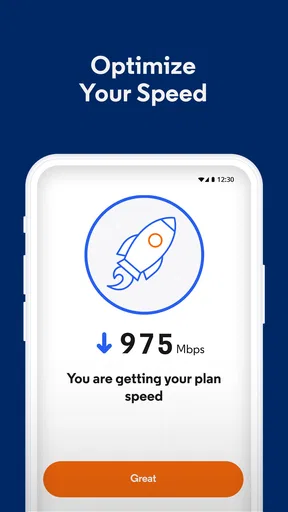
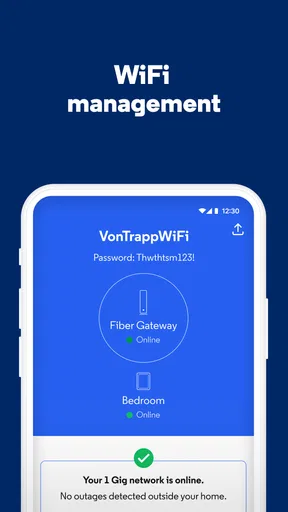
The WiFi side is especially relevant in a shared home. If a family member asks for the network information, or I need to reconnect a device after changing its settings, having that information available through the service app can be more convenient than searching through paperwork or opening a router interface. The important trade-off is that this convenience depends on having the right account access and on the app being able to present the information clearly. It is an account doorway, not a replacement for every advanced router control.
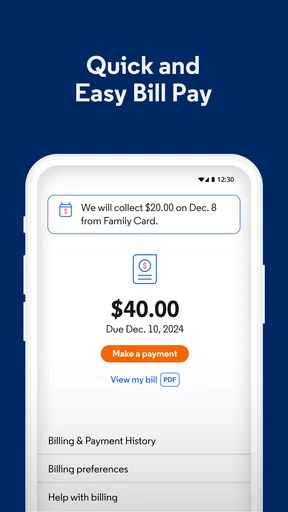
Payments are another reason to keep the app installed. A mobile payment workflow is valuable when I remember a bill while away from a computer or want to handle it immediately rather than leaving a browser tab open. The app’s role here is practical rather than clever: it puts a recurring household responsibility close to the device I already carry. That can make a difference for people who manage several monthly services and prefer one quick check instead of relying entirely on paper reminders or desktop bookmarks.
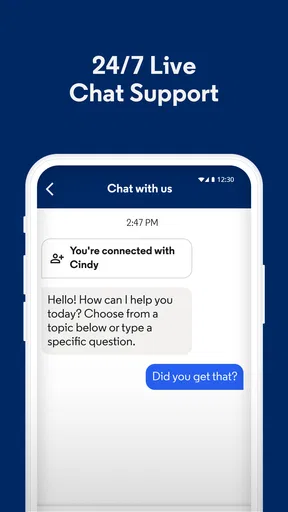
The help function rounds out the experience. When a connection problem appears, I usually want guidance before I want a long explanation of how the provider’s systems work. A dedicated help path can make it easier to find the appropriate support route. Still, I would treat it as a starting point. An app can help me identify where to ask for assistance, but it cannot guarantee that every service issue will be solved inside the app itself.
How I would use it during a normal week
Imagine a household preparing for a busy evening. A new device needs the home WiFi details, and at the same time the account holder remembers that a payment needs attention. With My Optimum, I can first check the relevant WiFi information, then move to the account payment area, and finally use the help section if the connection behaves strangely. The benefit is not that these tasks become exciting; it is that they stay together in one provider-specific workflow.
I also see value in using the app as a quick first stop before contacting support. If the problem is simple, the available help may point me toward a solution without making a call. If it is more involved, I can begin from the same place rather than guessing which support channel applies. That makes the app more useful for people who dislike navigating a large website on a small screen.
One practical habit I would recommend is checking the account details before an urgent situation occurs. It is easier to learn where WiFi information, payment tools, and help resources are located when the household is calm. Then, if a device disconnects or a billing task becomes time-sensitive, I am not learning the interface under pressure. This is a small workflow improvement, but it is where a provider app can deliver more value than its short description suggests.
Cost, access, and what “free” means here
My Optimum is free, so there is no app purchase to weigh against its everyday convenience. That makes the decision relatively simple for an existing Optimum customer: the main cost is the time spent installing it, signing in, and deciding whether its account tools fit your habits. The free price does not turn it into a free internet service, of course. It is a companion for managing a service relationship, not a substitute for the underlying subscription.
I appreciate that distinction because provider apps can be judged unfairly. If someone expects the application itself to improve connection performance or remove service charges, disappointment is likely. Its value comes from access and convenience. For a customer who regularly manages payments or needs WiFi information, that convenience may justify keeping it available. For someone who rarely touches the account and prefers a desktop browser, the free installation may offer little additional value.
The app has an average rating of 4.1 from around 16 thousand ratings, with roughly 2.4 thousand written reviews. I read that as a sign of a generally useful but not universally smooth experience. A rating in that range suggests that the core idea works for many customers while individual experiences can vary, especially around sign-in, account-specific behavior, or support expectations. I would not install it solely because of the rating; I would install it because the listed tasks match something I actually need to do.
Its reach is also meaningful: it has passed 500 thousand installs. That does not prove that every account type or household setup will feel identical, but it does show that the app is being used at a substantial scale. For me, the more important question remains whether I am an Optimum customer. Without that relationship, the app’s free access has little practical purpose.
Where the experience can feel limited
The strongest limitation is the app’s provider-specific nature. My Optimum is useful precisely because it concentrates on Optimum account tasks, but that also means it cannot serve as a universal dashboard for other internet providers, mobile plans, streaming subscriptions, or household bills. If I manage services from several companies, I still need separate apps or a broader financial tool for the rest of my routine.
I would also avoid confusing WiFi visibility with complete network management. Seeing relevant WiFi information can help with connection and device setup, but advanced users may still want controls that belong in a dedicated router or mesh-system application. If your priority is channel analysis, detailed device traffic, custom network rules, or technical diagnostics, a specialist network tool is likely a better fit. My Optimum’s strength is account convenience, not deep networking control.
Payments bring their own trade-off. The app can make the action easier to reach, but it may not replace a budgeting application that tracks every household bill across different providers. Someone who wants category reports, shared expense planning, or a complete calendar of due dates will probably prefer a dedicated finance tool. I see My Optimum as the place to manage the Optimum payment itself, not as the central command center for personal finances.
Support is similarly helpful but bounded. A help section can organize the next step, yet difficult outages, equipment faults, or account complications may still require direct assistance. I would not judge the app harshly for that limitation, because no account app can turn every technical problem into a self-service fix. The sensible approach is to use it for quick guidance and account actions, then move to the appropriate support route when the issue goes beyond those tools.
Another point is that the app’s usefulness depends on a successful account session. That is normal for a service-management application, but it means the experience is less valuable when I am helping someone else who is not the account holder or when I cannot access the relevant credentials. Before relying on it during an outage, I would make sure I can sign in and understand the basic navigation while the connection is working normally.
Version, device fit, and who should install it
The current version is 2.7.0.6, and it requires an operating system version of 10 or newer. In practical terms, most people with a reasonably current Android or iOS device should check compatibility before downloading, particularly if they keep an older phone for home use. The age rating is Everyone, so the app is positioned as a household account utility rather than something aimed at a mature audience.
I think the best match is an Optimum customer who wants three things close at hand: WiFi information, payment access, and a path to help. It is also a sensible choice for the person in a household who handles the internet account but is not especially interested in technical networking. The app’s focused design can save that user from digging through a website whenever a routine question appears.
It may be less worthwhile for a technically confident user who already manages the network through dedicated equipment and pays bills through a preferred banking workflow. It is also not the right choice for someone who does not have Optimum service, expects one app to manage every household utility, or wants a full productivity system with tasks, documents, calendars, and notes. The category label makes sense only in a narrow, service-management way; it should not be mistaken for a broad productivity platform.
My recommendation after weighing the trade-offs
I see My Optimum as a useful companion rather than an essential app for every customer. Its free access lowers the risk of trying it, and its focused set of account functions gives it a clear purpose. I like that it connects everyday needs that often occur together: finding WiFi information, dealing with a payment, and looking for help. That combination is more convenient than treating each task as a separate website hunt.
My recommendation is strongest for customers who manage their account from a phone or who occasionally need quick access while away from a computer. I would install it, sign in, explore the WiFi and payment areas, and locate the help route before an urgent problem appears. That short setup can reveal whether it fits your account and habits without committing you to a paid app or a new subscription.
I would skip it if your only goal is advanced network control, all-in-one bill management, or general productivity. In those cases, a router-specific tool, banking app, or conventional productivity suite will do a better job. But for the narrower job it sets out to handle, My Optimum is a sensible free utility. Its real value is convenience for existing Optimum customers, not extra functionality beyond the provider account.
Overall, I would recommend giving it a try if you already use Optimum and want a simpler mobile route to routine account tasks. The 4.1 average and broad install base suggest a product that works well enough for many people, while the limitations are understandable once its purpose is clear. I would keep expectations practical: use it as a mobile account desk, not as a replacement for your router, bank, or full productivity setup.
My Optimum earns its place when a small service task needs to be handled quickly. For the right customer, that focused convenience is enough to make a free installation worthwhile.
Verdict
Strengths of My Optimum
- View and pay your Optimum bill directly from the app.
- Manage internet, TV, and phone services in one place.
- Access account details without needing a desktop browser.
- Find support resources and contact options quickly.
- Useful for checking service information while away from home.
Limitations of My Optimum
- Some features may depend on your specific Optimum services.
- Login issues can make account access inconvenient.
- App performance may vary after updates or on older devices.
- Certain support requests may still require contacting an agent.
- Notifications and account data may not update instantly.
Similar Picks in This Category
View All
Google Calendar
Google LLC4.6

Google Drive
Google LLC4.3

Google Assistant
Google LLC3.9

Microsoft OneDrive
Microsoft Corporation4.6

Samsung Calendar
Samsung Electronics Co., Ltd.4.1

Microsoft OneNote: Save Notes
Microsoft Corporation4.6
Frequently Asked Questions
What is My Optimum, and what can I do with the app?
My Optimum is the official account-management app for Optimum customers. After signing in, you can review your internet, television, phone, or mobile services, check billing information, make payments, manage account settings, and view support options. Depending on your location and subscription, the available features may vary, so some users may see more tools than others.
Do I need an Optimum account to use My Optimum?
Yes, most of the app’s important features require an active Optimum account and valid sign-in details. You generally need to register through Optimum or use an existing account connected to your services. Without logging in, access may be limited to basic information or support resources. If you have trouble signing in, the app provides account-recovery options.
Can I pay my Optimum bill through the app?
My Optimum allows eligible customers to review their current balance, see billing details, and make payments directly from a mobile device. Payment methods and scheduling options can depend on your account and region. Before confirming a payment, carefully check the amount, selected payment method, and processing date, particularly if you are trying to avoid a late fee.
Can My Optimum help me troubleshoot internet or service problems?
The app includes support and troubleshooting tools that may help identify common issues with Optimum services. Depending on the problem, you may be able to check service status, restart or manage compatible equipment, review guidance, or contact customer support. These tools are useful for basic problems, although complex outages or hardware failures may still require professional assistance.
Is My Optimum free to download, and what permissions does it require?
My Optimum is generally available as a free download, although normal mobile data charges may apply when using it over a cellular connection. The app may request permissions related to notifications, device functionality, or account-related features. Review the permission prompts before accepting them, and install the application only from the official Google Play Store or Apple App Store.
